Spot Every Change: The Ultimate Way to Detect Differences
Introduction
In a world where content is constantly being edited, updated, and shared, keeping track of changes can quickly become overwhelming. Whether you're a developer comparing code, a writer reviewing edits, or a professional handling documents, identifying differences manually is both time-consuming and error-prone. This is where a Text Differ Tool becomes essential. It allows you to compare two versions of text instantly and highlights the exact differences in a clear and structured way. Instead of scanning line by line, you get a precise comparison within seconds.
What is a Text Comparison Tool?
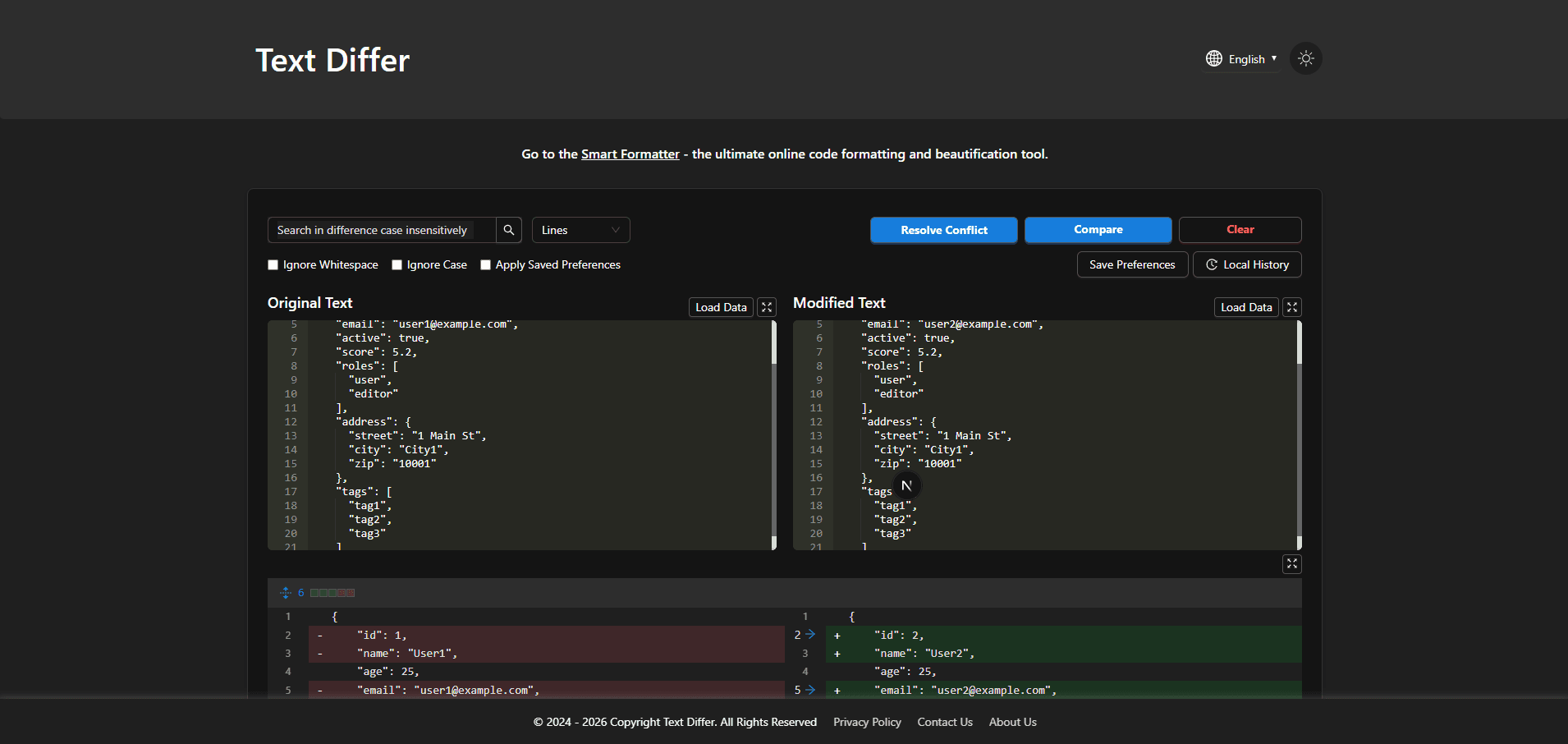
A Text Comparison Tool is an online utility that compares two texts, highlights additions, deletions, modifications, and formatting changes, and displays these differences visually for clear and easy understanding.
Step-by-Step Guide to Using a Text Diff Checker
- Paste the original text into the first input area.
- Paste the modified text into the second input area.
- Click the Compare or Find Difference button.
- Instantly view additions, deletions, modifications, and formatting changes highlighted visually for easy understanding.
Key Features of a Content Comparison Tool
- Instant Comparison: The tool processes large amounts of text within seconds, saving valuable time.
- High Accuracy Detection: It detects even the smallest differences such as punctuation, spacing, or single character changes.
- Side-by-Side View: Displays both texts next to each other for easy comparison.
- Inline View Option: Shows differences within a single unified view for compact analysis.
- Real-Time Results: Many tools update results instantly as you type or edit content.
- Secure Processing: Most modern tools run directly in your browser, ensuring your data remains private.
- No Installation Required: Access the tool from any device without downloading software.
Benefits of Using a File Diff Tool
- Saves Time and Effort: Manually comparing documents, code, or long text files can take a lot of time and is prone to mistakes. A file diff tool automates the process and completes comparisons in seconds, saving significant effort.
- Improves Accuracy: It's easy for humans to overlook small changes, especially in lengthy documents or complex code. A file diff tool highlights all differences precisely, ensuring nothing is missed.
- Ideal for Developers: Developers can use it to compare different versions of code, track modifications, debug efficiently, and maintain a clean version history without errors.
- Perfect for Writers & Editors: Writers, editors, and content creators can quickly review revisions, track changes between drafts, and maintain high-quality, error-free content.
- Enhances Productivity: By automating text comparison, the tool allows users to focus on more critical tasks, increasing workflow efficiency and reducing the mental load of manual checks.
Conclusion
A Text Comparison Tool is an essential solution for anyone who needs to compare text quickly and accurately. It eliminates the hassle of manual checking, improves accuracy, and saves valuable time. Whether you're working with code, documents, or simple text, this tool ensures you never miss a change. With its speed, precision, and ease of use, it has become a must-have utility in today's digital workflow.