3-Way Merge Tool - Resolve Conflicts Easily and Efficiently
Introduction
In collaborative projects, whether it's software development, document editing, or content management, multiple people often work on the same file simultaneously. This can lead to conflicts when different versions of the same file exist. A 3-Way Merge Tool is designed to solve this problem by allowing you to compare three versions of a file simultaneously and merge them accurately. The tool helps you identify conflicts, review changes, and combine multiple edits into a single, consistent version.
What is a Three-Version Merge Utility?
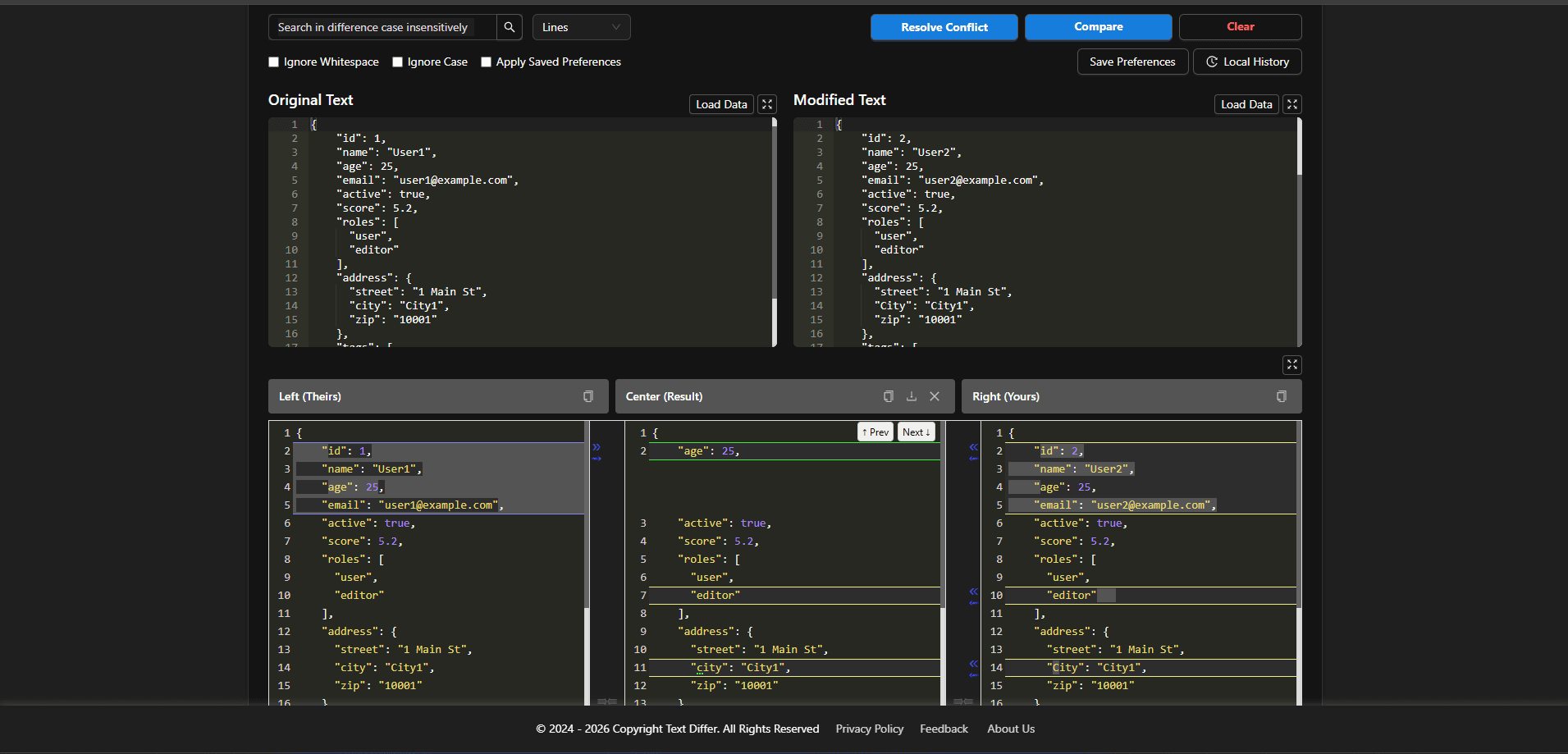
A Three-Version Merge Utility is a software feature in version control systems that compares an original base file with two modified versions, highlights differences and conflicts, and helps developers efficiently merge changes into a single final version. It highlights conflicting lines, shows what has been added, removed or modified and allows you to merge the versions into a final result efficiently.
Simple Steps to Use a Multi-Version Merge Tool
- Load the Original/Base version of the file into the left panel.
- Load the First modified version (Theirs) into the center or left panel.
- Load your Modified version (Yours) into the right panel.
- The tool automatically highlights differences and conflicts.
- Resolve conflicts by selecting which version to keep or by editing the merged result manually.
- Once done, save or export the final merged file.
Key Features of a Three-Panel Merge Tool
- Clear Visual Conflict Detection: Easily identify and understand conflicting changes across versions.
- Three-Panel Comparison View: View the original, left (theirs), and right (yours) versions side by side for better clarity.
- Smart Auto-Merge Suggestions: Automatically detects and merges non-conflicting changes to save time.
- Direct Editing Capability: Allows manual modifications in the final merged output when needed.
- Undo & Version History Support: Enables safe experimentation with the ability to revert changes anytime.
- Multi-Format Compatibility: Supports various file types including source code, plain text, and other document formats.
Benefits of Using a 3-Way Merge Tool
- Time Efficiency: Speeds up the merging process by automating comparisons, reducing the need for time-consuming manual conflict resolution.
- Higher Accuracy: Minimizes human errors by clearly highlighting conflicts and intelligently handling non-conflicting changes.
- Developer-Friendly: Helps developers quickly resolve version control conflicts (like in Git) without switching between multiple tools.
- Great for Writers & Editors: Makes it easy to combine edits from multiple contributors into one well-structured final document.
- Enhanced Productivity: Allows users to focus on meaningful work instead of spending excessive time comparing and merging file versions.
Conclusion
A 3-Way Merge Tool is essential for any collaborative workflow where multiple versions of the same file exist. By clearly showing differences, highlighting conflicts, and allowing safe merging, it ensures accuracy, saves time, and improves productivity. Whether you are a developer managing Git conflicts, a writer merging edits, or a team collaborating on a shared file, a 3-way merge tool simplifies the process and ensures that nothing gets lost or overwritten.